Manuals and documents
How Charyl answers from your manuals with the page cited, how walled brands work, and how to add your own documents.
By the end of this guide you’ll know how Charyl answers questions from your manuals, what happens when a brand won’t let her fetch one automatically, and how to add a document of your own when you’d rather hand her the PDF directly.
Cited, every time
Ask her something a manual would answer, and she reads the document itself rather than guessing from memory. A real exchange, from the web app: asked what the dishwasher manual says about cleaning the filter, she answers with the manual’s own steps, then closes with exactly where she found it.
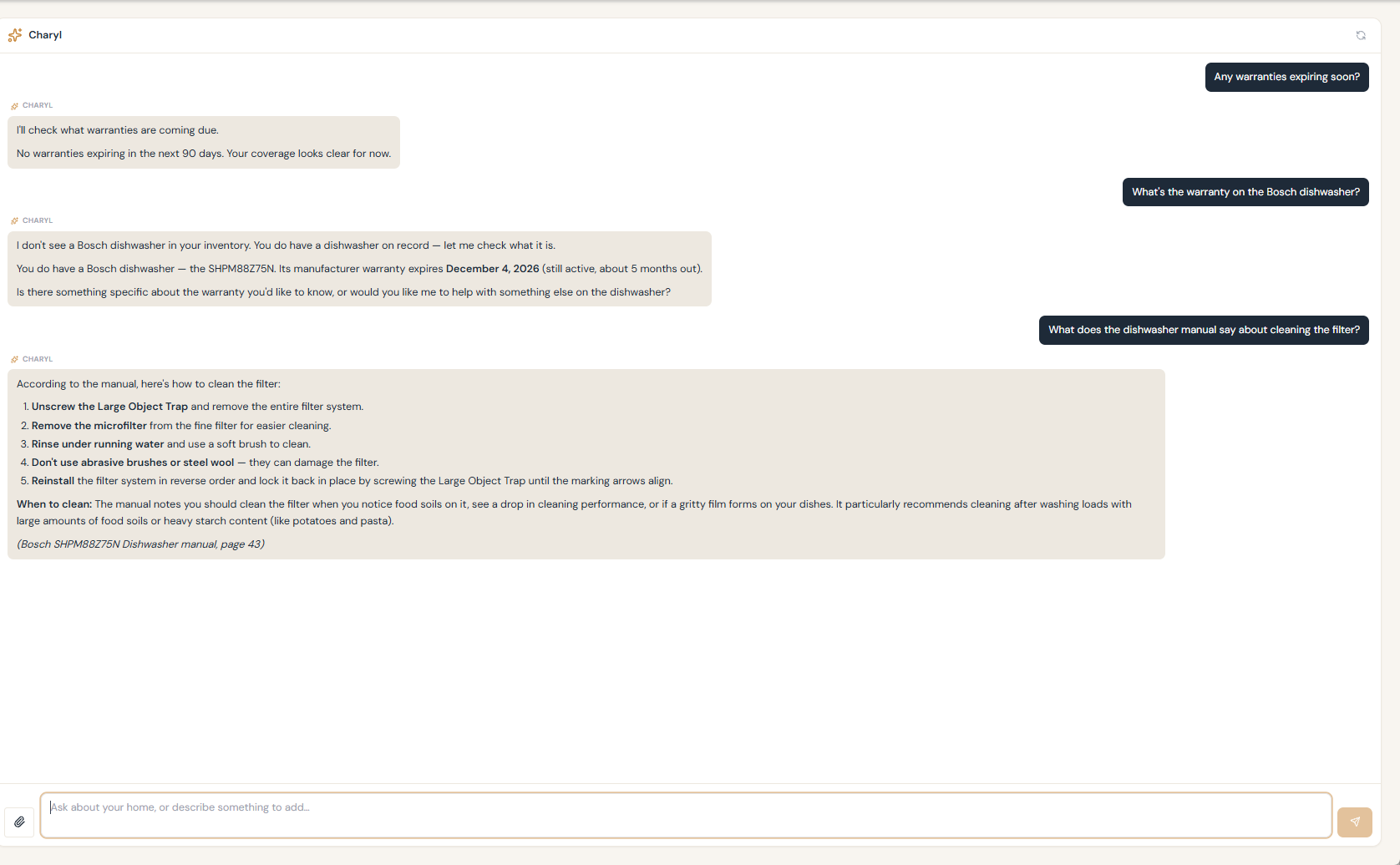
That citation — title and page — is the pattern throughout. If you want to check her work, or just read further than the answer covers, you know exactly where to look. It works the same whether the manual came from her own research when you first added the appliance, or from a copy you attached yourself later — the citation looks identical either way.
- Try: “What does error code F02 mean on my washer?”
- Try: “How do I reset the filter light on the fridge?”
Zero hits is not the same as nothing on file
If she comes back saying nothing matched, that means your question didn’t land close enough to anything indexed — not that the document isn’t there. Try rephrasing, naming the part more specifically, or asking about the model directly before concluding the manual is missing.
When a brand blocks the download
Some manufacturers block automated downloads of their own manuals. When that happens, Charyl can’t fetch a copy on her own — instead, she walks you through downloading it yourself, which works because the block is aimed at automated retrieval, not at you in your own browser. Once you have it, attach it the way you would any document and she’ll read it from there.
Why there’s no library to browse
Charyl doesn’t maintain a library of manuals for you to browse on your own. What she has is scoped to your home: manuals found for your specific appliances, and whatever you’ve added yourself. She answers from those and cites them — that’s the whole model, and it’s why an appliance she hasn’t researched, and you haven’t uploaded anything for, won’t have an answer waiting. What’s shared across homes is limited to facts like the make and model and where the manual lives — never the manual’s own text, which stays scoped to your home once she’s read it for you.
It lives with the asset, not just the conversation
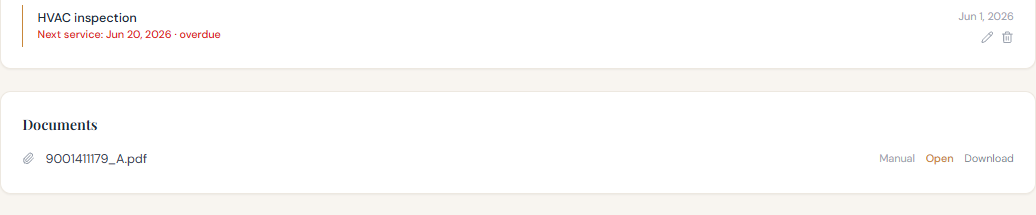
A document she’s indexed doesn’t only exist inside the exchange where you asked about it. Open the asset’s own page and you’ll find it listed there too, ready to open or download directly — the same document she was just quoting from a moment ago.
Adding a document of your own
-
Attach it
Drop a PDF into the chat, or attach it from an asset’s own page.
-
She indexes it
This works even on a turn where she can’t read the PDF herself in the moment — the rest of the system extracts and indexes it afterward, so the next question about it is answered from the real thing.
-
Ask away
From then on, treat it like any other document on file — cited, page and all.
If what you’re attaching is closer to a governing document than a product manual — a policy, a permit, something about the property rather than the appliance — she can file it as a Home Record instead of an asset document; the Home Records guide covers that path.